What is React? JSX Introduction and Your First Component
What problem React actually solves, how JSX syntax works, and how to build your first component.
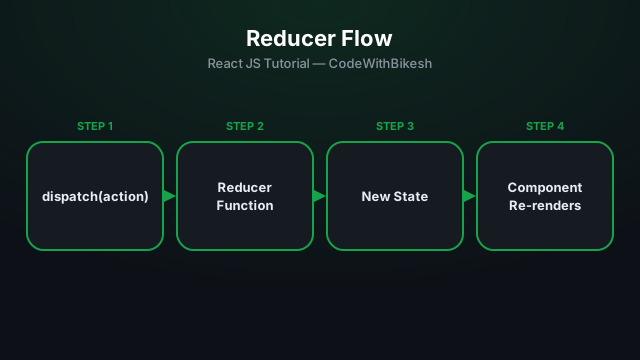
When a component's state gets complex — multiple sub-values, with update logic that depends on each other — a pile of separate useState calls gets messy. useReducer gives you a predictable pattern: all update logic lives in one place, a "reducer" function.
function cartReducer(state, action) {
  switch (action.type) {
    case 'ADD_ITEM':
      return { ...state, items: [...state.items, action.payload] };
    case 'REMOVE_ITEM':
      return { ...state, items: state.items.filter(i => i.id !== action.payload) };
    case 'CLEAR':
      return { ...state, items: [] };
    default:
      return state;
  }
}
A reducer is a pure function: it takes the current state and an action, and returns new state — it never mutates the previous state.
function Cart() {
  const [state, dispatch] = useReducer(cartReducer, { items: [] });

  function addItem(product) {
    dispatch({ type: 'ADD_ITEM', payload: product });
  }

  return (
    <div>
      <p>Items in cart: {state.items.length}</p>
      <button onClick={() => addItem({ id: 1, name: 'Keyboard' })}>
        Add Keyboard
      </button>
      <button onClick={() => dispatch({ type: 'CLEAR' })}>Clear Cart</button>
    </div>
  );
}
The component just calls dispatch and describes what happened (ADD_ITEM) — the logic for how state should change is centralized inside the reducer.
(state, action) => newState — a pure function, no mutation.dispatch(action) triggers an update, with the logic living inside the reducer.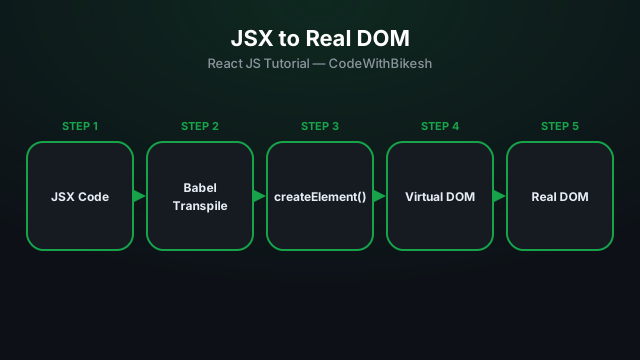
What problem React actually solves, how JSX syntax works, and how to build your first component.
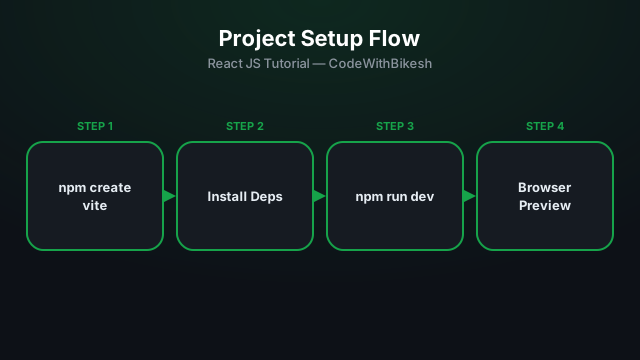
Set up a modern React project in seconds with Vite, and understand the resulting folder structure.
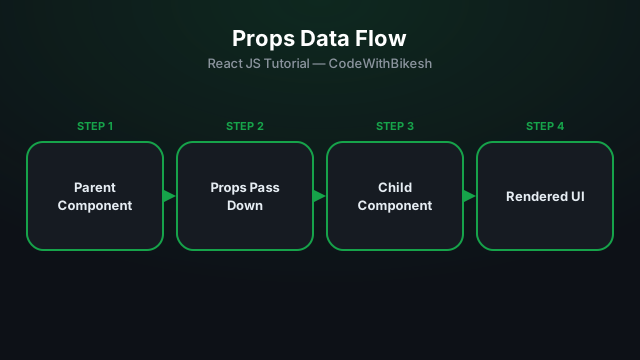
Build functional components and pass data from parent to child components using props.