What is React? JSX Introduction and Your First Component
What problem React actually solves, how JSX syntax works, and how to build your first component.
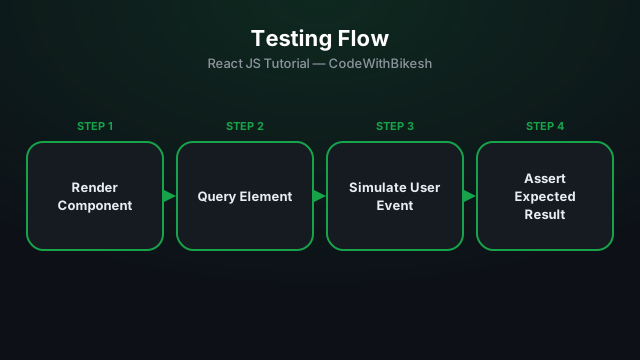
Testing gives you confidence that your app still works correctly after a code change. The most common combo in the React ecosystem is Jest (test runner + assertions) and React Testing Library (RTL) (for rendering and interacting with components).
RTL's core idea is: "the more your tests resemble the way real users use your app, the more confidence they give you." That's why RTL encourages testing what's visible on screen and how a user interacts with it, rather than internal implementation details (state, props).
// Counter.jsx
function Counter() {
  const [count, setCount] = useState(0);

  return (
    <div>
      <p>Count: {count}</p>
      <button onClick={() => setCount(c => c + 1)}>Increment</button>
    </div>
  );
}// Counter.test.jsx
import { render, screen } from '@testing-library/react';
import userEvent from '@testing-library/user-event';
import Counter from './Counter';
test('increments count when button is clicked', async () => {
const user = userEvent.setup();
render(<Counter />);
expect(screen.getByText('Count: 0')).toBeInTheDocument();
const button = screen.getByRole('button', { name: /increment/i });
await user.click(button);
expect(screen.getByText('Count: 1')).toBeInTheDocument();
});This test follows exactly the flow a real user would: the page renders, a button is found (by its role/text, not by DOM structure), it's clicked, and the result is verified on screen.
getByRole('button', { name: '...' }) — find by accessibility role, the most recommended approach.getByText('...') — find by visible text.getByLabelText('...') — for form inputs, by their label.render() mounts the component, screen queries it, userEvent interacts with it.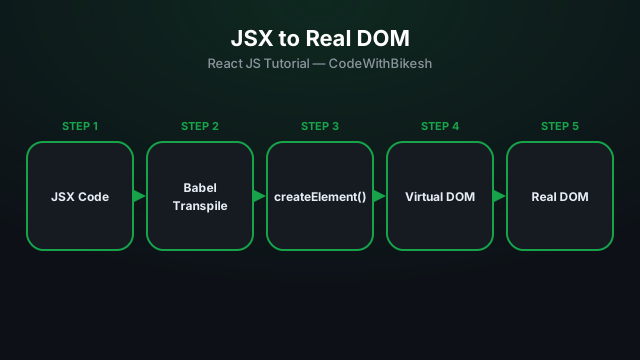
What problem React actually solves, how JSX syntax works, and how to build your first component.
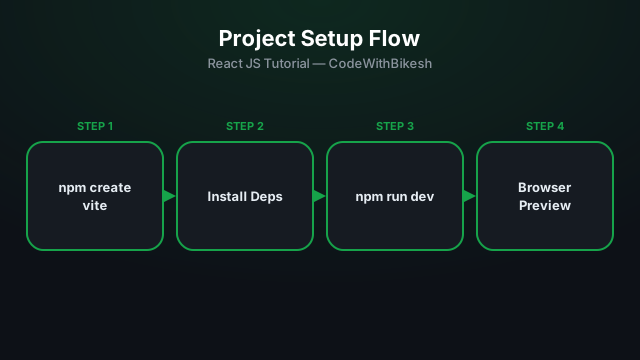
Set up a modern React project in seconds with Vite, and understand the resulting folder structure.
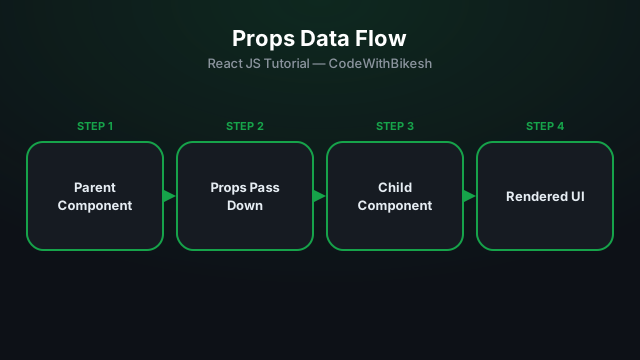
Build functional components and pass data from parent to child components using props.