What is React? JSX Introduction and Your First Component
What problem React actually solves, how JSX syntax works, and how to build your first component.

When an app grows large, and lots of unrelated components need the same global data (user session, cart, notifications), Context alone isn't always enough (especially for frequent updates). Redux Toolkit (RTK) — Redux's official, modern approach — is well suited to this scale.
npm install @reduxjs/toolkit react-redux// store.js
import { configureStore } from '@reduxjs/toolkit';
import counterReducer from './counterSlice';
export const store = configureStore({
reducer: {
counter: counterReducer,
},
});// counterSlice.js
import { createSlice } from '@reduxjs/toolkit';
const counterSlice = createSlice({
name: 'counter',
initialState: { value: 0 },
reducers: {
increment: (state) => {
state.value += 1; // safe to "mutate" here because RTK uses Immer internally
},
decrement: (state) => {
state.value -= 1;
},
incrementBy: (state, action) => {
state.value += action.payload;
},
},
});
export const { increment, decrement, incrementBy } = counterSlice.actions;
export default counterSlice.reducer;In traditional Redux, a reducer could never mutate state directly — but RTK uses the Immer library, which lets you write "mutation-looking" code while it produces an immutable update behind the scenes.
// main.jsx
import { Provider } from 'react-redux';
import { store } from './store';

createRoot(document.getElementById('root')).render(
  <Provider store={store}>
    <App />
  </Provider>
);import { useSelector, useDispatch } from 'react-redux';
import { increment, decrement } from './counterSlice';
function Counter() {
const count = useSelector((state) => state.counter.value);
const dispatch = useDispatch();
return (
<div>
<p>{count}</p>
<button onClick={() => dispatch(increment())}>+</button>
<button onClick={() => dispatch(decrement())}>-</button>
</div>
);
}createSlice defines actions and reducer logic together, in one place.useSelector reads data from the store, useDispatch triggers actions.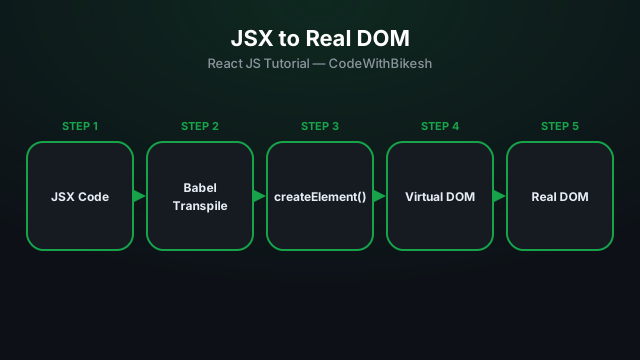
What problem React actually solves, how JSX syntax works, and how to build your first component.
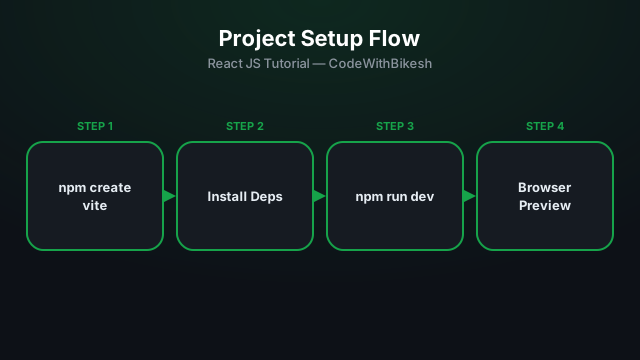
Set up a modern React project in seconds with Vite, and understand the resulting folder structure.
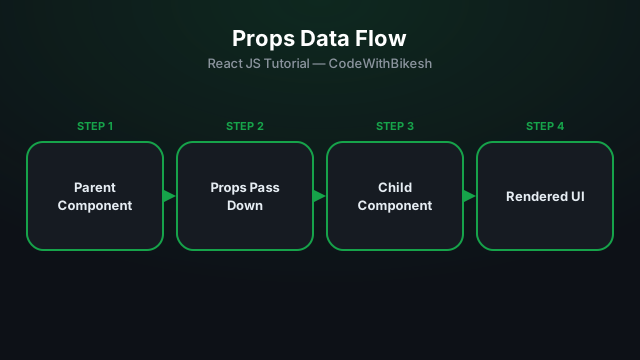
Build functional components and pass data from parent to child components using props.