What is React? JSX Introduction and Your First Component
What problem React actually solves, how JSX syntax works, and how to build your first component.

In plain HTML, an input manages its own value. In React, the "controlled component" pattern is used instead — the input's value always comes from React state, and every keystroke updates that state. This keeps a form's entire data in one place (state).
function NameForm() {
  const [name, setName] = useState('');

  return (
    <input
      type="text"
      value={name}
      onChange={(e) => setName(e.target.value)}
      placeholder="Enter your name"
    />
  );
}
value={name} binds the input to React state, and onChange updates that state on every keystroke — which means the input's current value always matches the state.
Instead of creating a separate useState for every field, using a single object state plus one shared handler scales much better:
function ContactForm() {
  const [formData, setFormData] = useState({ name: '', email: '', message: '' });

  function handleChange(e) {
    const { name, value } = e.target;
    setFormData(prev => ({ ...prev, [name]: value }));
  }

  function handleSubmit(e) {
    e.preventDefault();
    console.log('Submitting:', formData);
  }

  return (
    <form onSubmit={handleSubmit}>
      <input name="name" value={formData.name} onChange={handleChange} placeholder="Name" />
      <input name="email" value={formData.email} onChange={handleChange} placeholder="Email" />
      <textarea name="message" value={formData.message} onChange={handleChange} placeholder="Message" />
      <button type="submit">Send</button>
    </form>
  );
}
The trick is that each input's name attribute matches an object key — so [name]: value (a computed property) lets one function handle every field.
onChange updates that state.handleChange function scales well.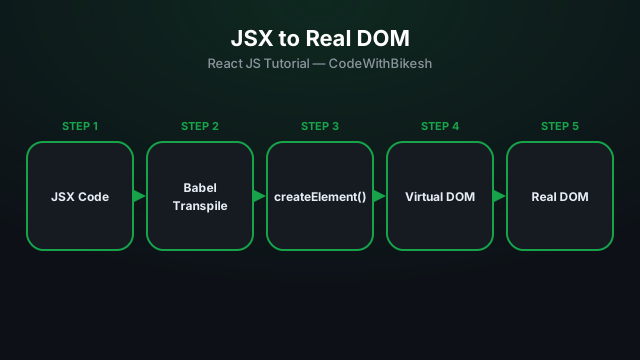
What problem React actually solves, how JSX syntax works, and how to build your first component.

Set up a modern React project in seconds with Vite, and understand the resulting folder structure.
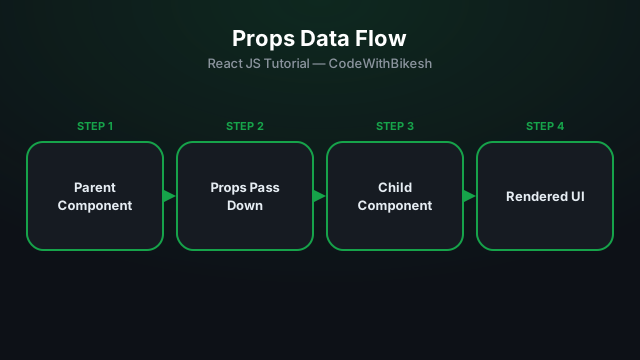
Build functional components and pass data from parent to child components using props.