What is React? JSX Introduction and Your First Component
What problem React actually solves, how JSX syntax works, and how to build your first component.

Events in React are slightly different from plain HTML: names are written in camelCase (onClick, onChange), and the handler is a function reference, not a string.
function LikeButton() {
  function handleClick() {
    console.log('Button clicked!');
  }

  return <button onClick={handleClick}>Like</button>;
}
Notice: write onClick={handleClick}, not onClick={handleClick()} — the latter would call the function immediately at render time.
function ProductList({ products }) {
  function handleRemove(id) {
    console.log('Removing product', id);
  }

  return (
    <ul>
      {products.map(p => (
        <li key={p.id}>
          {p.name}
          <button onClick={() => handleRemove(p.id)}>Remove</button>
        </li>
      ))}
    </ul>
  );
}
Here we use an arrow function () => handleRemove(p.id) so it can be called with id, without the function executing immediately.
React wraps events in a SyntheticEvent that behaves consistently across all browsers. To stop a form from submitting the normal way:
function SearchForm() {
  function handleSubmit(e) {
    e.preventDefault(); // stops the page reload
    console.log('Searching...');
  }

  return (
    <form onSubmit={handleSubmit}>
      <input type="text" placeholder="Search..." />
      <button type="submit">Go</button>
    </form>
  );
}onClick, onChange, onSubmit.e.preventDefault() to stop the browser's default reload on form submit.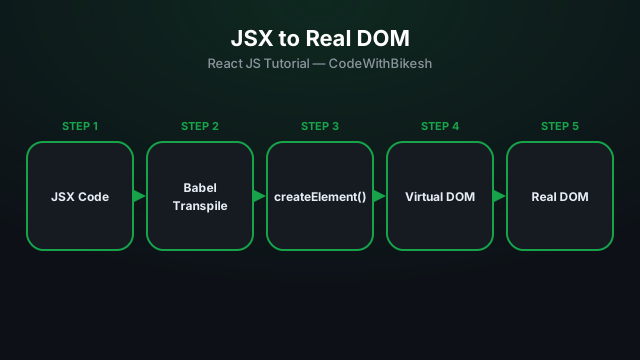
What problem React actually solves, how JSX syntax works, and how to build your first component.
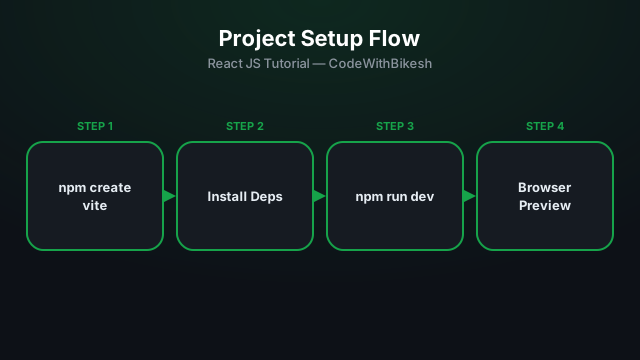
Set up a modern React project in seconds with Vite, and understand the resulting folder structure.
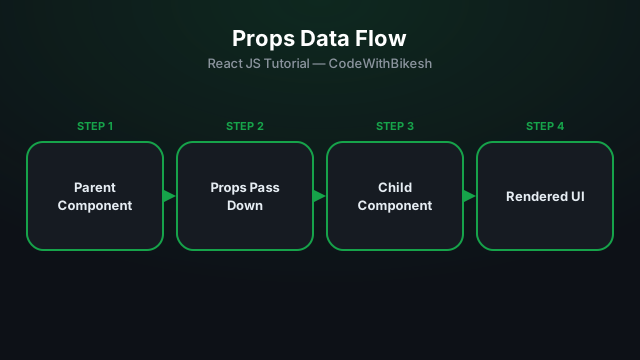
Build functional components and pass data from parent to child components using props.